Configure Center Data
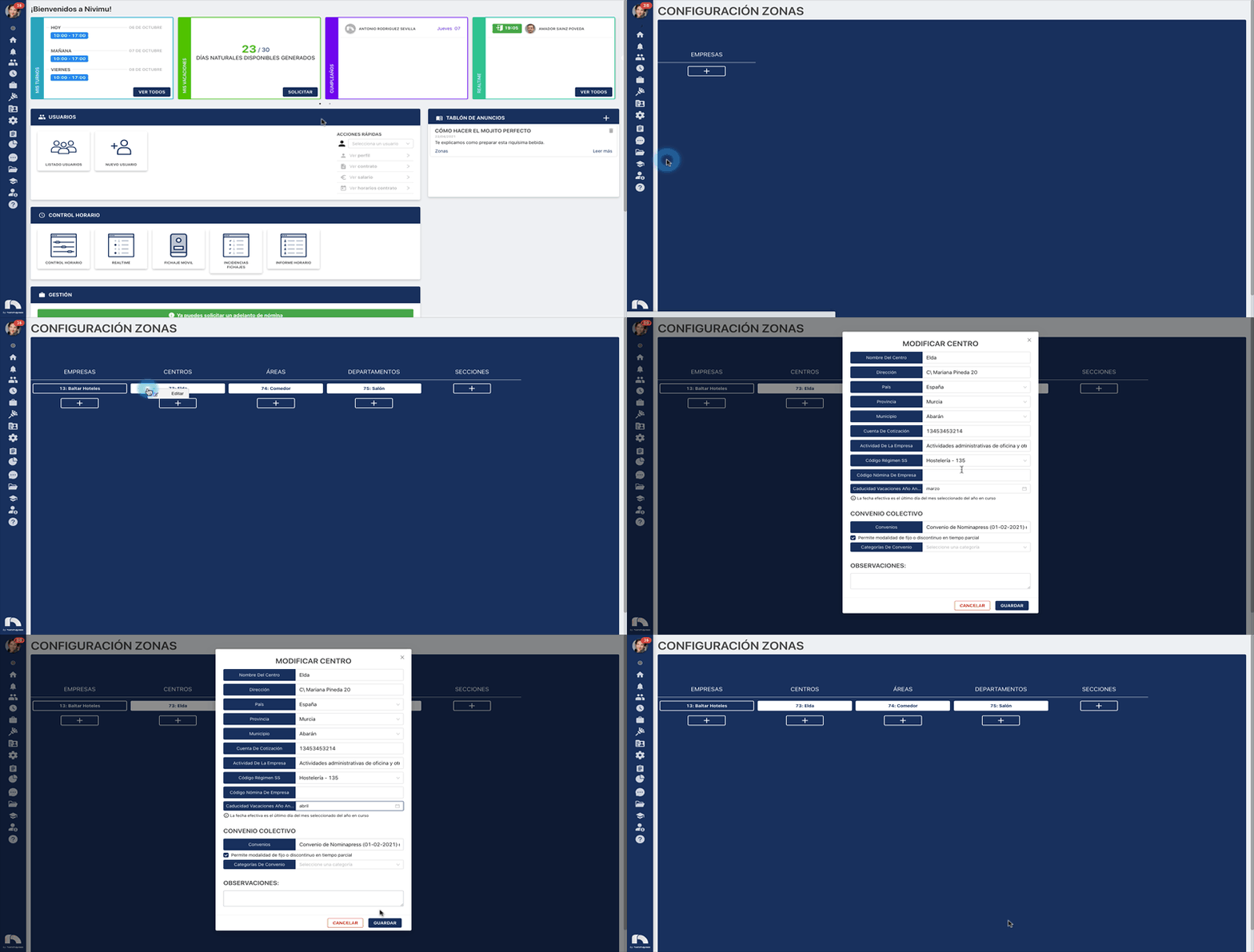
Once the company is created, we must complete the center data. To do this:
-
Open the application menu and in the Settings section right-click on Zones.
-
Select the center in which you want to configure the data by right-clicking and then select Edit. On mobile/tablet, tap with 2 fingers on the center.
-
In Center Name enter the Center Name.
-
In Address enter the Center Address.
-
In Country enter the Center Country.
-
In Province enter the Center Province.
-
In Municipality enter the Center Municipality.
-
In Social Security Contribution Account enter the company's Social Security Contribution Account.
-
In Company Activity enter the Center's Company Activity.
-
In SS Regime Code enter the Center's SS Regime Code.
-
In case of integration with payroll system enter in the field Payroll System Code (Center) the center code.
-
In Previous Year Vacation Expiration enter the month in which the vacations of said center will expire, keeping in mind that they will expire on the last day of the month.
-
In Time Zone enter the Center's Time Zone.
-
In Agreements select the collective agreement by which your center is governed. You can select the option "Allows fixed or discontinuous modality in part-time".
-
In Agreement Categories enter the Center's Agreement Categories in case the agreement only contemplates one type of professional categories (for example 5 stars). It is not necessary to fill this section, if we do it when we configure the internal categories it will delete those internal categories not contemplated by the agreement category. We can also add observations to the center.
-
Finally click on Save.
Configure center data: hour bank multipliers
For hour bank management it is necessary to adjust by centers the multipliers, these parameters will be taken into account to manage hour excesses, worked free days and clocked holidays.
- Open the application menu and in the Settings section right-click on Zones.
- Select the center in which you want to configure the data by right-clicking with the mouse button and then select Edit. On mobile/Tablet, tap with 2 fingers on the center.
- In the "Hour Bank" section enter the multipliers in absolute values by which the center is governed.
- Pay options: if said concept (overtime, free days or holidays) is paid when worked. For overtime we can add several values that we will later select in the management of the corresponding request.
- Compensate options: if said concept (overtime, free days or holidays) is compensated with additional free time when worked.
- For overtime we can deactivate a multiplier without needing to delete it.
- Activate both option: to be able to do both things.
- Finally, click on Save.