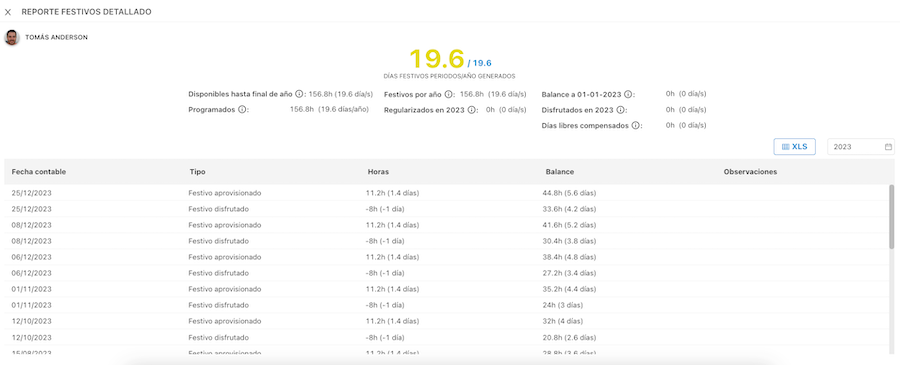
Holiday Provisioning
Holiday functionality has been improved to provision holiday hours to the employee. An anticipated global calculation of holiday hours corresponding to a user is performed automatically.
These holiday hours are calculated based on their contract period. If the user's contract has an indefinite end date, it will be calculated in the current year: from contract start date to year end.
All holidays belonging to the user per their workplace configuration and assigned within their contract period will be considered for provisioning.
Center Configuration
First, configure the holidays corresponding to each company center.
WIKI: Configure Holidays in Nivimu
If you change a holiday group assignment to a center, holiday provisioning will recalculate for all users at that center.
Agreement Configuration
From the agreements module, edit holiday configuration applied to users with that agreement enabled.
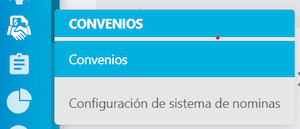
- In the agreements section of the Nivimu main menu, access the
Agreementspage:
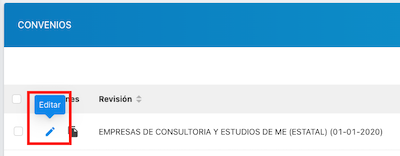
- Next, click
Editon the agreement/pact you want.
- In the agreement/pact edit form, in the
Holidayssection, you can edit multiplier configuration.
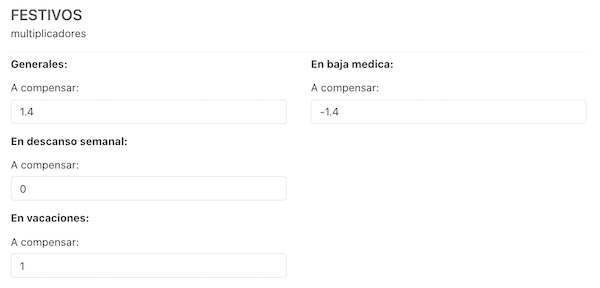
- Multipliers represent how holiday hours are computed in different situations affecting a user:
General: The user enjoys the holiday.On sick leave: The holiday occurs during an accepted sick leave.On weekly rest: The holiday coincides with a day off.On vacation: The holiday falls during approved vacation.
The value assigned in each option will multiply by that day's theoretical hours corresponding to the employee.
Theoretical × Multiplier
The day's theoretical hours are the hours an employee should work, determined by contract schedule, weekly contract days and hours, operational shifts, custom theoretical for that day, etc.
You can enter both positive and negative values:
- If the value is positive: positive provisioning will be generated in favor of the employee.
- If the value is negative: negative provisioning will be generated. See Practical Examples for use cases
- If the value is 0: no provisioning will be generated.
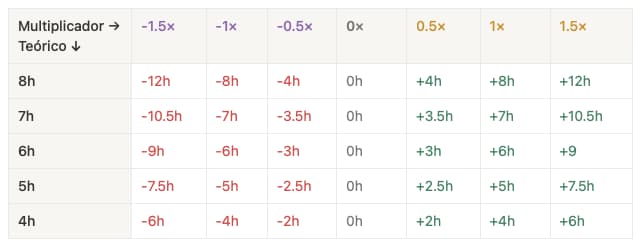
The On sick leave, On weekly rest, and On vacation multipliers add to the General multiplier - they don't replace it.
Provisioning Display
To check each user's provisioning:
On the Requests page, when selecting a user, the Holidays widget appears next to Vacation and Hours bank.
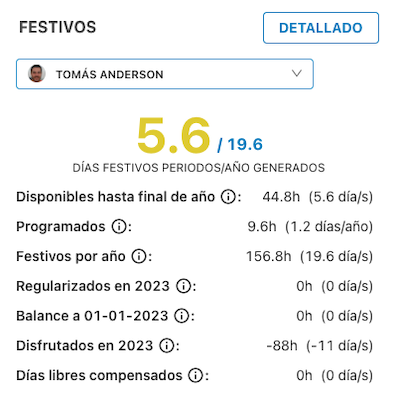
At the top of the widget, see a summary of holiday days assigned to the user in the current period/year.
Below you can check:
- Available until year end: Holidays available until year end.
- Scheduled: Includes all holiday bank movements from current date to year end, excluding the current day.
- Holidays per year: Number of holiday days the employee is entitled to annually per contract.
- Regularized in 2023: Holidays regularized during 2023. If positive, adds available days; if negative, subtracts available days.
- Balance on 01-01-2023: Holiday balance at the start of 2023.
- Taken in 2023: Accepted holidays already taken in 2023.
- Days off compensated: Days off granted as compensation for having worked during holidays.
Clicking the Detail button shows a detail of the user's holiday hours movements.
If holiday groups are set at the center for a future year, however distant, it will provision according to the same logic, and records for that year can be viewed by changing the year in the detail filter.