Contract Period
A contract can be set for a fixed duration or indefinite.
Fixed-term contract
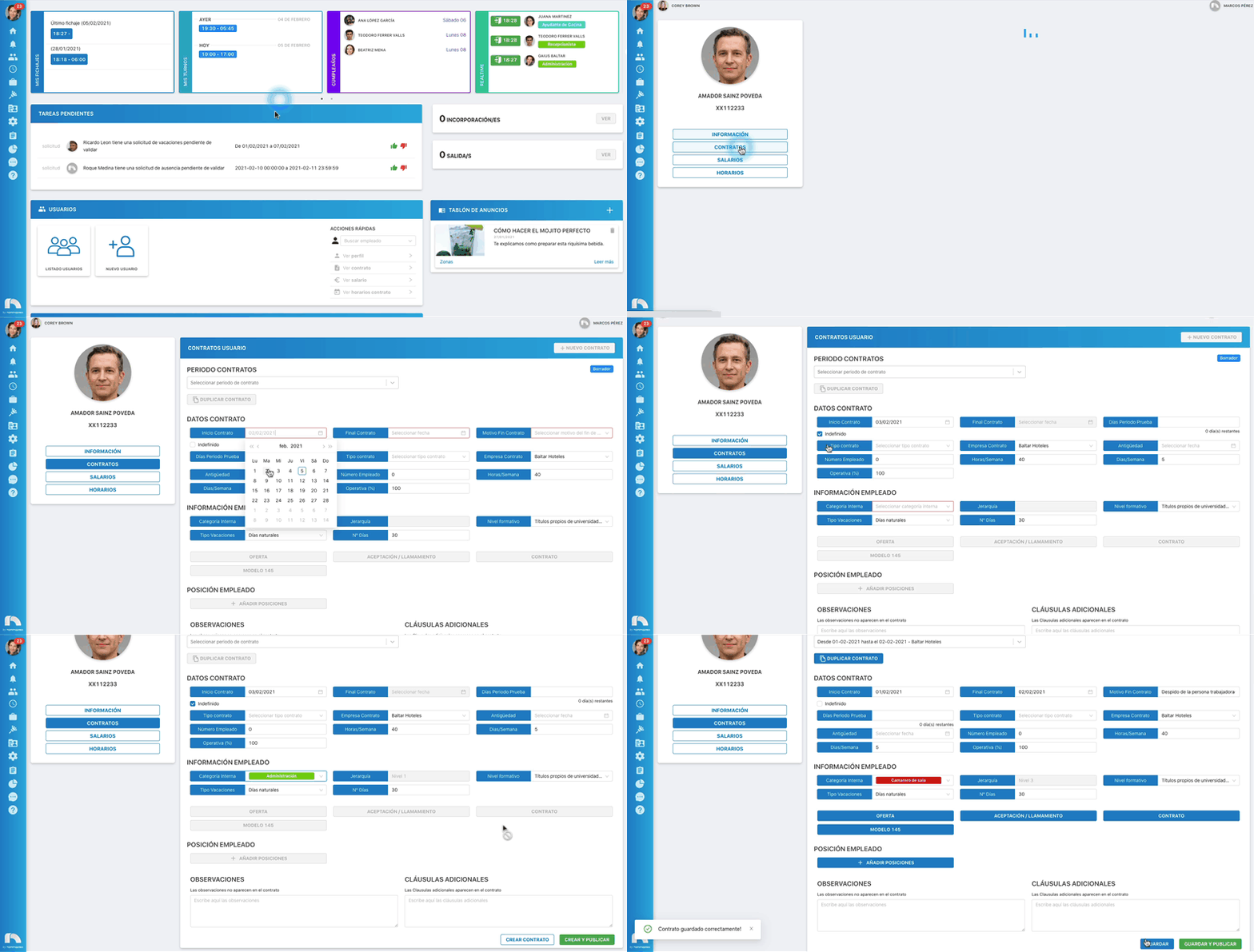
- Menu → Users → User List.
- Find the employee → View Profile.
- Click Contracts.
- If there is an active contract, end it first via End Contract (bottom). Then create the new one.
- In Contract Data, set start and end dates.
- In Contract end reason, choose the reason.
- Fill remaining fields and click Save changes.

Indefinite contract
- Menu → Users → User List.
- Find employee → View Profile.
- Click Contracts.
- End current contract first if needed (bottom End Contract), then create new.
- In Contract Data, set start date and check Indefinite (end date disabled).
- Fill remaining fields and click Save changes.
Probation days
- Menu → Users → User List.
- Find employee → View Profile.
- Click Contracts.
- End existing contract if needed, then create new.
- In Contract Data, set start/end (or mark indefinite).
- In Probation days, set the number of days.
- Fill remaining fields and click Save changes.

Note
Once published, contract data cannot be edited unless you revert to draft.